My UI/UX Course Experience Week 9
- Sam Fakhri
- 29 de jun. de 2023
- 4 min de leitura

Hello again! For this week we transition from a researcher to a designer. When embarking on the design process, it's essential to establish a strong foundation through user flows, storyboarding, and wireframes. These three interconnected aspects serve as the stepping stones toward building a low-fidelity prototype, enabling designers to envision and refine their ideas before moving forward. In this blog post, we will explore why user flows, storyboarding, and wireframes are pivotal in UI/UX design and my experience learning them.
1. User Flows:
User flows outline the path a user takes through a digital product, from the initial entry point to accomplishing their goals. It focuses on understanding user behavior and interactions within the system. By creating user flows, designers gain valuable insights into the logical structure and sequence of actions necessary to achieve desired outcomes. User flows help identify potential roadblocks, bottlenecks, or areas of confusion, allowing designers to optimize the user experience and streamline the navigation process. By mapping out user flows, designers can ensure that their designs align with user expectations and goals, leading to a more intuitive and satisfying user experience.
During this week, one of the proposed assignments was to create our own user flow, and for the sake of more visual demonstration, this is what a user flow might look like for a product like the one I'm developing (A concert merch app for a punk band) while in written form. "1. User opens the app.
2. User lands on the homepage.
3. The homepage features the newest and trendiest merch, with additional options to continue browsing, view the news section with relevant punk scene updates, or browse tickets for upcoming shows.
4. If the user chooses to explore the merch, they can select an item to view more details.
5. The item page provides information such as price, description, available sizes, etc., and offers options to buy/add to the cart or go back.
6. If the user chooses to add the item to their cart, a prompt appears asking if they would like to continue browsing or proceed to the cart.
7. In the cart, the user can proceed to checkout and enter their payment and shipping details.
8. After providing the necessary information, the user is directed to a page displaying all the order details, with a "Finalize Purchase" button.
9. If the user finalizes the purchase, an in-app pop-up appears, thanking them and indicating that they will receive an email with the order confirmation and a customized estimated shipping date message."
Hopefully, this helps illustrate what a user flow might be.
2. Storyboarding:
Storyboarding brings the design process to life by visualizing the user's journey in a narrative format. It involves sketching out key screens or moments within a user flow, capturing the essence of the user experience in a sequential manner. Storyboarding allows designers to explore various design possibilities, consider different user scenarios, and identify potential design challenges early on. It serves as a communication tool, enabling designers to share and gather feedback from stakeholders, developers, and other team members. Storyboarding helps align everyone involved in the design process, fostering collaboration and ensuring a cohesive vision for the final product.
During this week we also had the chance to create our own storyboards, and for the sake of more visual demonstration, this will also be useful:

In this first example, we have something called a "big picture" storyboard, showing the interaction of the user and what he might be going through while using our product or app.

For the second example, we have an image depicting a "close-up" storyboard, which shows what it would look like for a user interacting with our app.
Both are extremely important, as they help iterate scenarios that might allow new features or new solutions to problems that haven cup up during the ideation phase, for example.
3. Wireframes:
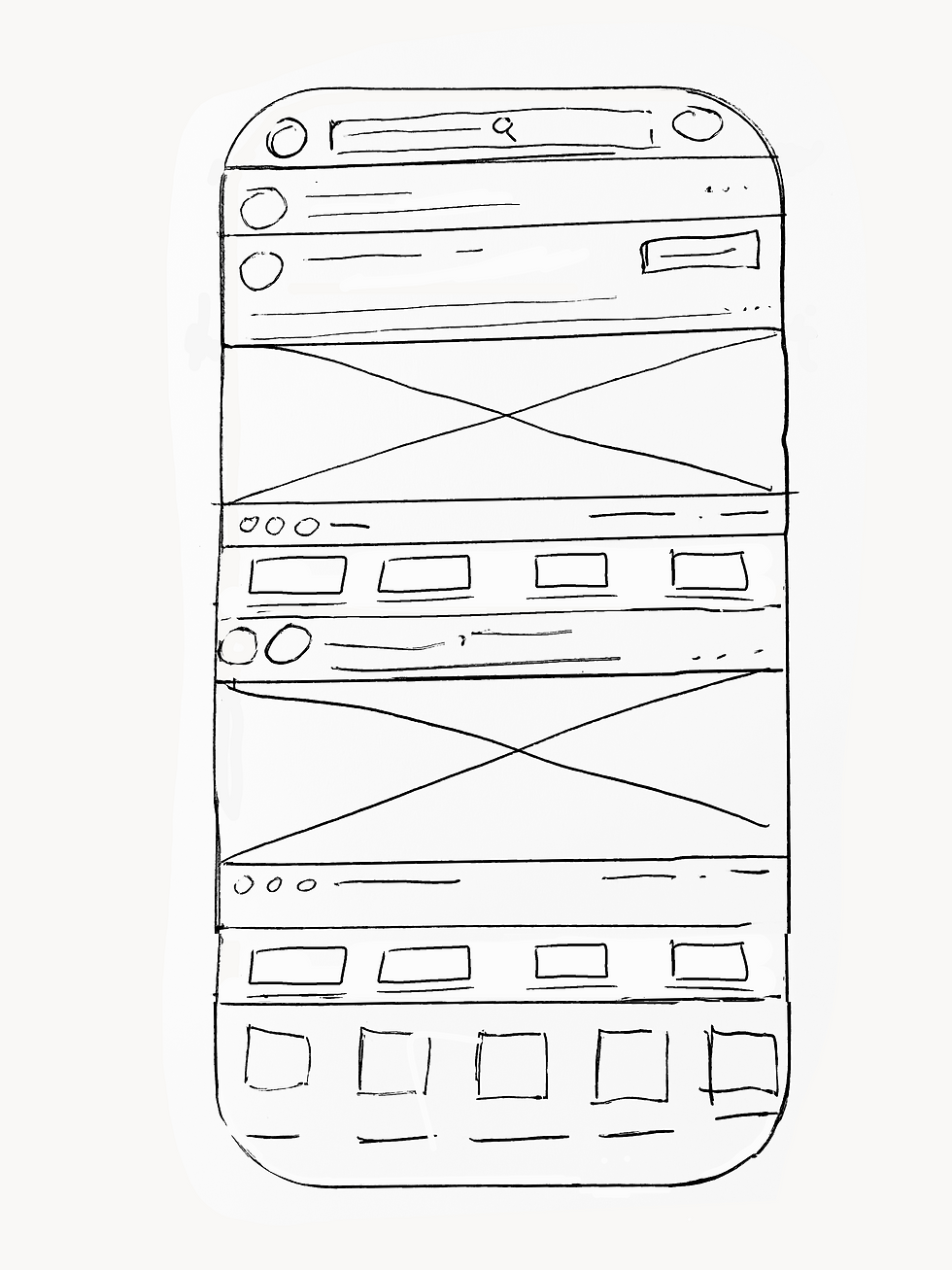
Wireframes are skeletal representations of the user interface, devoid of visual embellishments, focusing solely on layout, structure, and functionality. They serve as blueprints for UI design, illustrating the placement of elements, content hierarchy, and overall interaction flow. Wireframes allow designers to iterate quickly and experiment with different design approaches without getting caught up in aesthetic details. By creating low-fidelity wireframes, designers can gather early feedback, validate design decisions, and make necessary adjustments before investing significant time and effort in high-fidelity mockups or prototypes. Wireframes provide a solid foundation for the UI design phase, ensuring a user-centered and efficient interface.
Here is an example of a quick wireframe sketch done this week to exemplify the homepage of an app, in this case, I used LinkedIn:
User flows, storyboarding, and wireframes play pivotal roles in the UI/UX design process. They provide designers with the necessary tools and insights to create intuitive, user-friendly, and visually appealing digital experiences. By understanding user behavior, visualizing the user journey, and outlining the structure and functionality of the interface, designers can build a solid foundation for their designs. Embracing these techniques early on in the design process allows for effective collaboration, streamlined decision-making, and ultimately, the creation of outstanding digital products that resonate with users.
Remember, UI/UX design is an iterative process, and these tools facilitate experimentation, iteration, and improvement throughout the entire design journey. So, dive into user flows, storyboarding, and wireframes, and watch as your designs take shape with clarity, purpose, and user-centricity.


Comentários